GstarCAD 2025 Overview
GstarCAD 2025 Overview
Contents
- #Improvement Performance
- #Improvement DIM
- #Improvement 3D Model Import & Export
- #Improvement File & Layout Tab Bar
- #Improvement Lasso Selection
- #Improvement Undo
- #Improvement Batch Plot
- #Improvement QR Code
- #Improvement PASTESPEC
- #Improvement License Manager
- #New Hardware Acceleration
- #New Parametric Constraints
- #New BIM Data Editing
- #New 3D Mouse Device Adaption
- #New Voice Annotation
- #New Break at Point
- #New DWGUNITS
- #New Application Manager
- #Innovative API


GstarCAD 2025 Overview
Elevating Performance, Empowering Design
GstarCAD 2025 elevates performance to a new level with Hardware Acceleration and other improvements, significantly enhancing the design experience. Exciting new features include Parametric Constraints, BIM Data Editing, and Voice Annotation, etc., which further enrich functionality. Moreover, compatibility has been expanded with the addition of Python support, empowering more robust customization and automation. Without further ado, let's explore these exciting updates!
Improvement Performance
GstarCAD 2025 introduces an incremental save mechanism, boosting SAVEAS speed by over 30% and QSAVE by more than three times. File reading, display, and software initialization are optimized, improving average drawing opening speed by over 25%. TRIM and EXTEND performance on complex drawings improved by 69%, and HATCH display precision is also enhanced, eliminating excess lines in gradient and transparent hatch, ensuring a more efficient workflow.

Improvement DIM
To create various types of dimensions, you no longer need to switch between different commands. Simply execute the DIM command, hover your mouse cursor over objects to see a dimension preview, click to confirm, and place the dimension. This streamlines the annotation process and enhances efficiency.

Improvement 3D Model Import & Export
On the basis of IFC Import, you can now export IFC files and import RVT files with complete BIM data, and STEP/IGES module will be included in GstarCAD installer, you don't need to install it separately.

Improvement File & Layout Tab Bar
The File Tab Bar and Layout Tab Bar in GstarCAD 2025 have been updated with new appearances. Adding "New" and "List" buttons, now you can create, open, switch drawings/layouts directly from the tab bar, making operations more convenient and efficient. Additionally, indicators for “Read Only” or “Modified” files have been added too to provide clearer status visibility.

窗体顶端
Improvement Lasso Selection
Lasso selection allows you to create an irregularly shaped window or crossing selection set, which is beneficial when selecting objects in complex drawings. Window Selection has also been optimized by adding Fence, Window Polygon and Crossing Polygon options.

Improvement Undo
In GstarCAD 2025, continuous zooming, panning, and layer-related operations can be undone in one step, streamlining the workflow and reducing repetitive actions.

Improvement Batch Plot
The Batch Plot feature in GstarCAD 2025 has made comprehensive improvements based on user feedback to support a wider range of scenarios. There are 11 major updates, covering Specify Batch Setup, Plot Setup Options, File Setup and Processing Options, ensuring a more efficient and flexible plotting experience.

Improvement QR Code
The QRCODE command now supports command line mode -QRCODE, facilitating the creation of QR codes via scripts or programs.

Improvement PASTESPEC
After copying data from an Excel worksheet to the clipboard, use the PASTESPEC command and select 'Paste Link' to paste the Excel data as 'DWG Entities'. After insertion, you can modify the table. Additionally, a data link will be automatically created, and you can update this link using the DATALINKUPDATE command.

Improvement License Manager
GstarCAD 2025 introduces key updates to enhance licensing management and security, such as: subscription notifications before expiration, real-time online user number display for the GstarCAD Network License Manager, and the upgrade of the USB standalone dongle from Living Dongle to the Moway Dongle.

New Hardware Acceleration
GstarCAD 2025 now includes Hardware Acceleration, which uses the powerful graphics processing capabilities of the GPU to help the CPU handle tasks more efficiently. This update greatly improves the quality of graphic display and speeds up your work, enhancing the overall performance of the software.

New Parametric Constraints
GstarCAD 2025 introduces Parametric Constraints, focusing exclusively on geometric constraints this year. Geometric constraints manage how objects relate to others, enabling automatic adjustments to other objects when changes are made, ensuring design precision and efficiency.

New BIM Data Editing
BIM data can now be edited directly in GstarCAD 2025, providing enhanced efficiency for your design workflow!

New 3D Mouse Device Adaption

New 3D Mouse Device Adaption
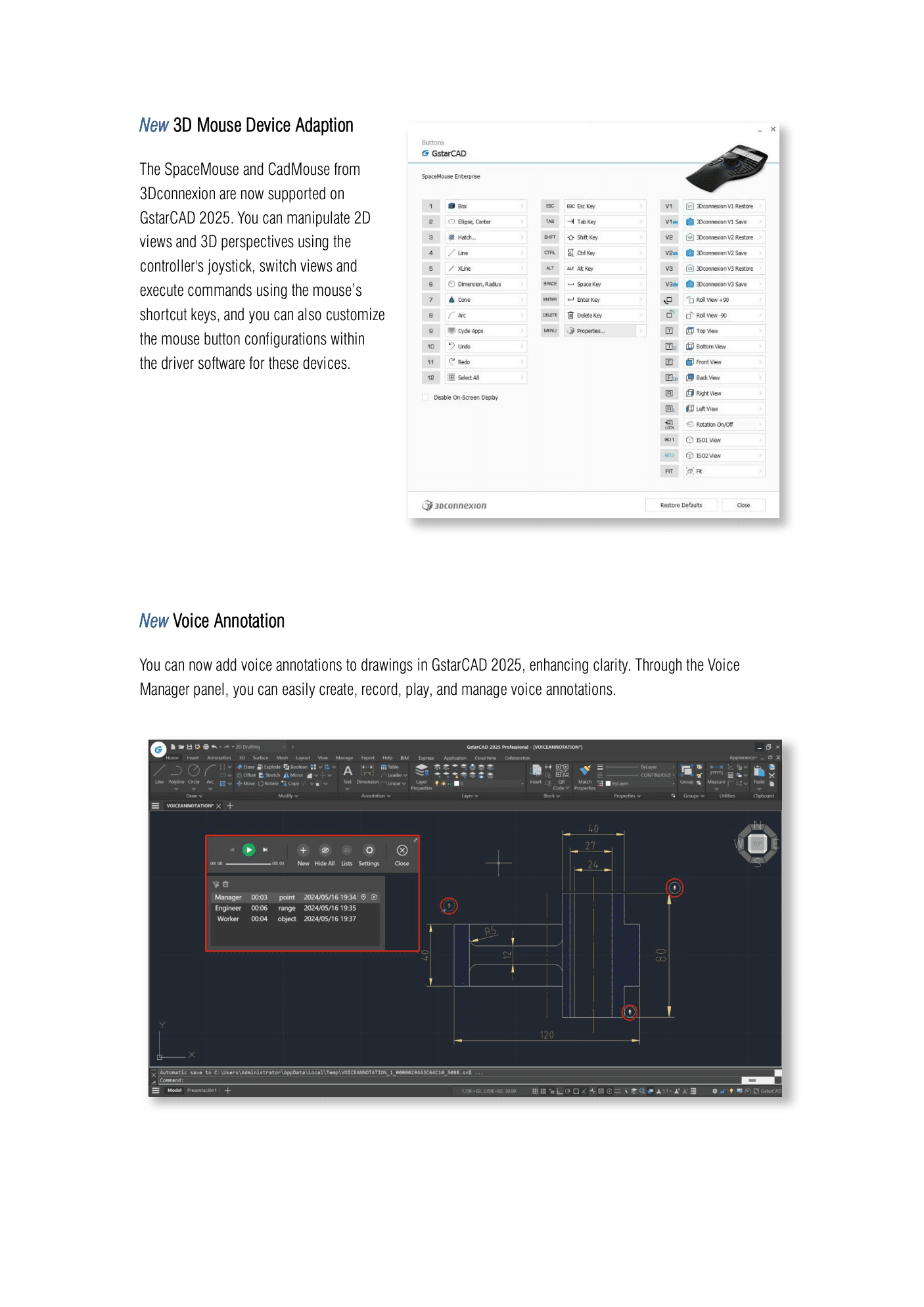
The SpaceMouse and CadMouse from 3Dconnexion are now supported on GstarCAD 2025. You can manipulate 2D views and 3D perspectives using the controller's joystick, switch views and execute commands using the mouse’s shortcut keys, and you can also customize the mouse button configurations within the driver software for these devices.
窗体顶端
New Voice Annotation
You can now add voice annotations to drawings in GstarCAD 2025, enhancing clarity. Through the Voice Manager panel, you can easily create, record, play, and manage voice annotations.

New Break at Point
BREAKATPOINT command allows you to break the selected object into two objects at a specified point, without the need to specify a second point and create a gap like the BREAK command does.

New DWGUNITS
Different projects or application scenarios may require different units. For example, architectural design might use meters, while mechanical design might use inches. In GstarCAD 2025, the newly added DWGUNITS command allows you to change the units of drawings to meet the standard size and annotation requirements of the drawing and avoid errors due to using different units.

New Application Manager
Application Manager is a unified system for plugin management. Users can search, enable/disable, and view details of modular applications within the Application Manager, achieving the most suitable service configuration with minimal resource utilization.

Innovative API
GstarCAD offers robust APIs for developers to migrate or build applications on GstarCAD. This year, in addition to the continuous improvement of integrity and compatibility of GRX, .NET and LISP interfaces, GstarCAD 2025 now supports Python, offering over 790 commonly-used python interfaces, thus empowering more robust customization and automation.