GstarCAD 2020 Overview
GstarCAD 2020 Overview
Contents


GstarCAD 2020 Overview
The most desirable alternative CAD.
GstarCAD 2020 comes out with comprehensively 3D optimization, newer practical features and important enhancements, making your design smoother and efficient. With the best-ever performance, seamless compatibility and the full functionalities, GstarCAD 2020 becomes the most desirable alternative CAD.
New Interface
GstarCAD 2020 offers you a concise and familiar interface which you can easily customize. The new attractive dark color theme and icon designs will reduce your eyes strain. It’s also available for you to display and rearrange elements like the toolbars, display the command bar, switch between workspaces, change the interface themes, customize your own interface and enable the status bar. The toolbars and command bar can also be floated anywhere on the screen or docked as well.

New Quick Properties
Quick Properties is a set of objects properties displayed through the Properties Palette. GstarCAD 2020 is able to customize your own Quick Properties, you can decide to show your preferred object type with selected object properties to save the limited drawing space.
In Quick Properties menu, you can choose object types and properties of the object which you want to show in Quick Properties palette. You are allowed to enable and disable the properties of the objects as needed. Additional, you can override the General Properties for all Object Types and restore the settings for Quick Properties.

Paired PDF illustration layout — page 3


Paired PDF illustration layout — page 3
New Collaboration Features
GstarCAD Collaboration enables cross-department and cross-team design collaboration based on DWG drawings, allowing designers/draftsmen easily to trace and return back to any previous version and locate design changes by one click, ensuring design quality and overall accuracy. To further improve team efficiency, GstarCAD 2020 adds more new features in Coloration such as Milestone, Project Branches, Export Logs, View Drawing Changes, and Reference File Relocation.


New.IFC File Format Import and Export
GstarCAD 2020 supports .IFC file format import and export. IFC (Industry Foundation Classes) is a standard format used in building and construction industry that provides interoperability between different software applications. Since IFC format supported in GstarCAD 2020, you can import and export standard IFC file format, as well as view 3D models by category and operate in GstarCAD conveniently.

New and Improvement PDF Import and Export
More and more designers require to edit the PDF file vector based directly in GstarCAD rather than just import a pdf as reference. GstarCAD 2020 can not only insert the PDF file as underlay, but also has the ability to eidt the imported PDF objects and export the PDF with a high quality.
New PDFIMPORT
GstaCAD allows you to import the objects from a PDF file as editable objects.
You can access the Import PDF from File-Import-PDF, you can input PDFIMPORT command or click Insert Tab- Import Panel-PDF Import.
Select a PDF file, after clicking open button, the Import PDF dialog box will pop up:


Improvement Export PDF

Improvement Export PDF
As you kown, GstarCAD has the ablity to export to various of file formats, such as DWF, DWFX, WMF, EMF,SAT,STL, EPS, DXX, BMP, DWG file formats. GstarCAD is focusing on the user experience, develops and publishes features that users highly request constantly. GstarCAD 2020 supports to export to PDF file format. You can access this feature from File button - Export - PDF or input EXPORTPDF from the command line.

3D Improvement

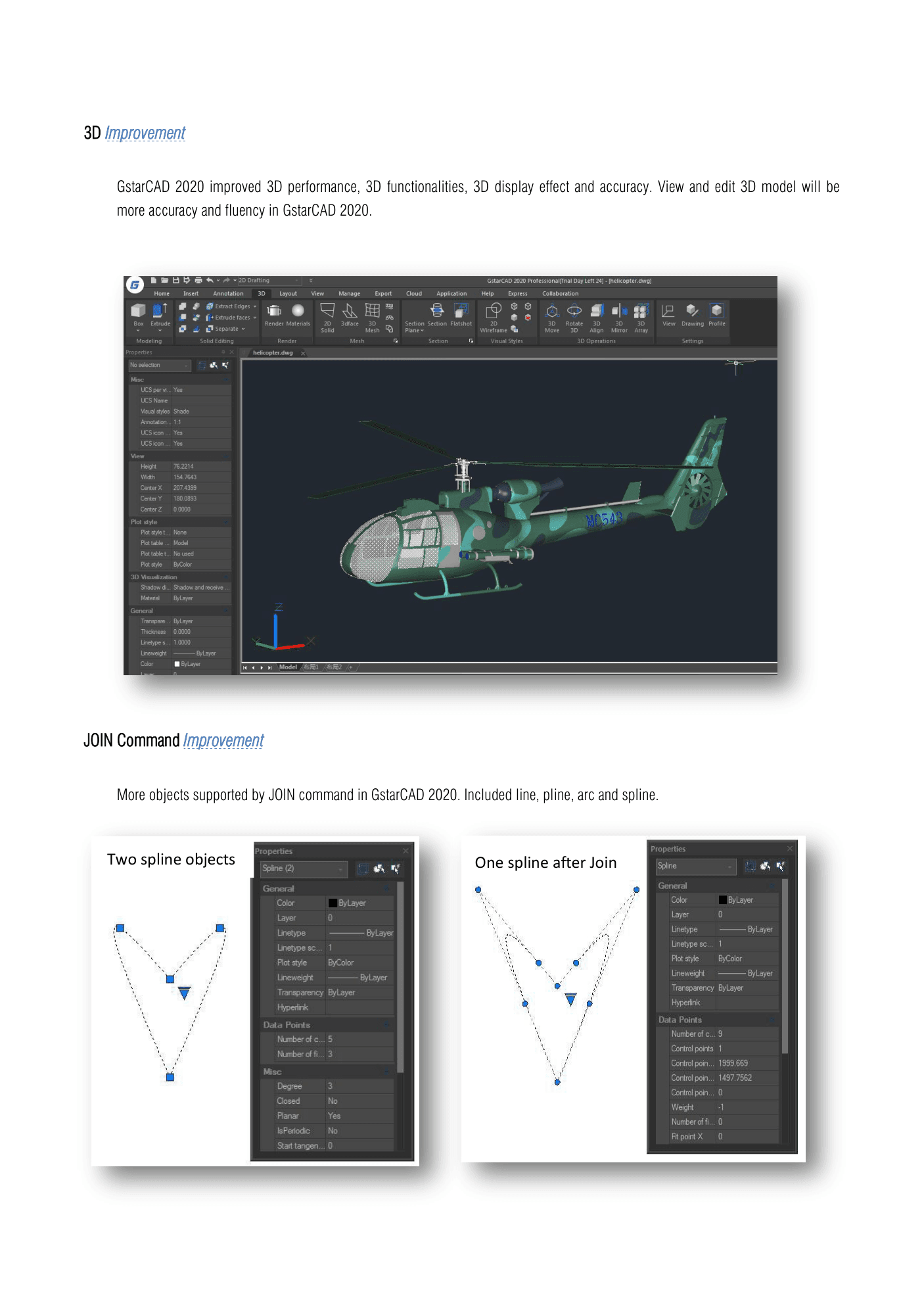
GstarCAD 2020 improved 3D performance, 3D functionalities, 3D display effect and accuracy. View and edit 3D model will be more accuracy and fluency in GstarCAD 2020.
JOIN Command Improvement
More objects supported by JOIN command in GstarCAD 2020. Included line, pline, arc and spline.
Two spline objects

One spline after Join

Display Improvement for 4K Monitor
Support for high resolution monitors continues to be improved in GstarCAD 2020 to ensure the best possible viewing experience even on 4K displays and higher. Commonly used user interface elements, such as the Start tab, Command line, palettes, dialog boxes, toolbars and grips are appropriately scaled and displayed as per the Windows setting.
GRX Interface Improvement
GstarCAD offers friendly development interface. Nowadays, hundreds of professional applications and industrial solutions are running on GstarCAD. In GstarCAD 2020, the GRX interface has been further refined and make developers more easily to switch their applications to GstarCAD.
For more information about applications on GstarCAD, please refer to the link:
https://www.gstarcad.net/application/